


Brightspeed Business
Hub Support
Brightspeed Business
Hub Support
Brightspeed Business
Hub Support
 Sign in to Business Hub

Using the Bill Analyst Feature
Using the Bill Analyst Feature
Using the Bill Analyst Feature
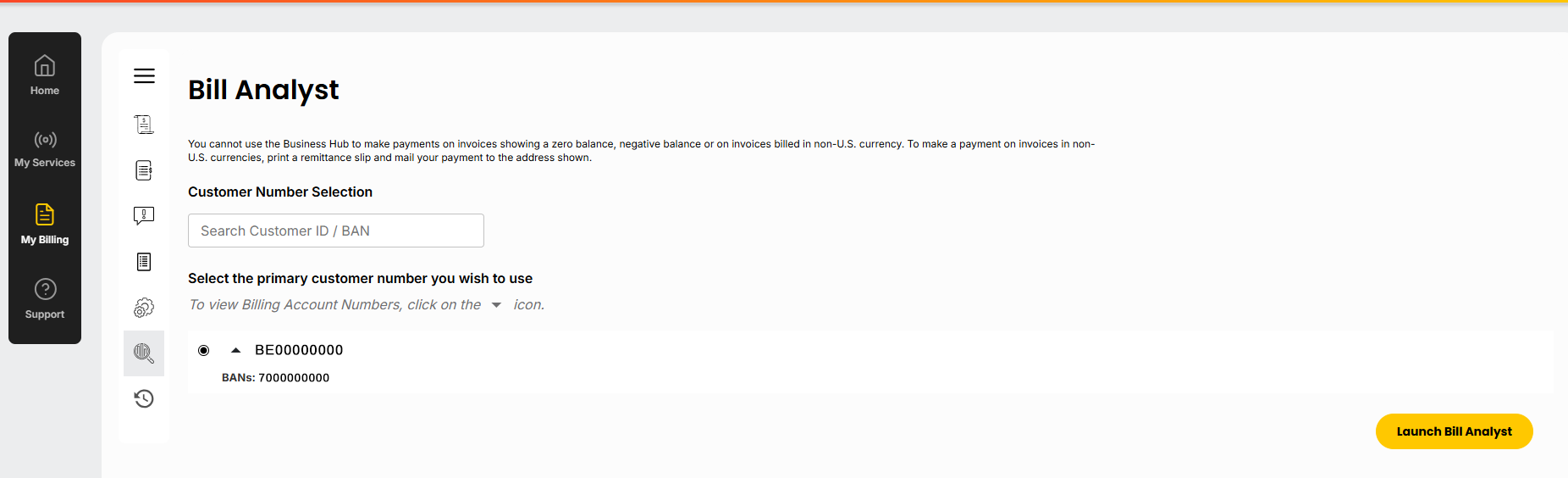
Bill Analyst, accessed via the Business Hub, is Brightspeed’s built-in analysis and reporting application for business customers. It’s designed to help you view, analyze, and report on your billing data for your business accounts.
Bill Analyst, accessed via the Business Hub, is Brightspeed’s built-in analysis and reporting application for business customers. It’s designed to help you view, analyze, and report on your billing data for your business accounts.
Bill Analyst, accessed via the Business Hub, is Brightspeed’s built-in analysis and reporting application for business customers. It’s designed to help you view, analyze, and report on your billing data for your business accounts.
You can use the Bill Analyst tool to:
Understand spending patterns for telecom/data services.
Allocate costs across departments or cost centers.
Detect anomalies or billing errors.
Prepare reports for internal accounting or budgeting.
Launch Bill Analyst
Log in to the Brightspeed Business Hub with your credentials.
Go to the Billing section.
Select the account you want to analyze.
Click Launch Bill Analyst, which opens the tool in a new window. Please ensure your browser allows pop-ups.
The Billing Analyst is divided into the following sections:
Charges Analysts: Breaks down bill by type of charge, trends & components
Monthly Spend: Shows total spending per cycle over time
Public Notice: Notices and/or legal billing policy announcements
Report Orders: Lists and manages your ordered statements and reports
About Bill Analyst: Describes the tool’s purpose and capabilities
You can use the Billing Analyst to:
Analyze Billing Information
Explore your billing data in depth by viewing, billing statements, comparing billing cycles, examining consolidated statements across multiple accounts (if applicable) and setting up hierarchies to organize service data by department, location, or cost center.
Generate Reports
You can create custom reports tailored to what matters most to you. The tool focuses heavily on customizable reporting like:
Summary Reports: High-level billing trends like (e.g., total charges over time).
Detail Reports: Line-item level details showing usage, charges, and service costs.
Export and Share
You can often view your results in tables or graphs right in the interface. Reports can be ordered, downloaded, scheduled for recurring delivery, or shared with team members depending on permissions.
You can use the Bill Analyst tool to:
Understand spending patterns for telecom/data services.
Allocate costs across departments or cost centers.
Detect anomalies or billing errors.
Prepare reports for internal accounting or budgeting.
Launch Bill Analyst
Log in to the Brightspeed Business Hub with your credentials.
Go to the Billing section.
Select the account you want to analyze.
Click Launch Bill Analyst, which opens the tool in a new window. Please ensure your browser allows pop-ups.
The Billing Analyst is divided into the following sections:
Charges Analysts: Breaks down bill by type of charge, trends & components
Monthly Spend: Shows total spending per cycle over time
Public Notice: Notices and/or legal billing policy announcements
Report Orders: Lists and manages your ordered statements and reports
About Bill Analyst: Describes the tool’s purpose and capabilities
You can use the Billing Analyst to:
Analyze Billing Information
Explore your billing data in depth by viewing, billing statements, comparing billing cycles, examining consolidated statements across multiple accounts (if applicable) and setting up hierarchies to organize service data by department, location, or cost center.
Generate Reports
You can create custom reports tailored to what matters most to you. The tool focuses heavily on customizable reporting like:
Summary Reports: High-level billing trends like (e.g., total charges over time).
Detail Reports: Line-item level details showing usage, charges, and service costs.
Export and Share
You can often view your results in tables or graphs right in the interface. Reports can be ordered, downloaded, scheduled for recurring delivery, or shared with team members depending on permissions.
You can use the Bill Analyst tool to:
Understand spending patterns for telecom/data services.
Allocate costs across departments or cost centers.
Detect anomalies or billing errors.
Prepare reports for internal accounting or budgeting.
Launch Bill Analyst
Log in to the Brightspeed Business Hub with your credentials.
Go to the Billing section.
Select the account you want to analyze.
Click Launch Bill Analyst, which opens the tool in a new window. Please ensure your browser allows pop-ups.
The Billing Analyst is divided into the following sections:
Charges Analysts: Breaks down bill by type of charge, trends & components
Monthly Spend: Shows total spending per cycle over time
Public Notice: Notices and/or legal billing policy announcements
Report Orders: Lists and manages your ordered statements and reports
About Bill Analyst: Describes the tool’s purpose and capabilities
You can use the Billing Analyst to:
Analyze Billing Information
Explore your billing data in depth by viewing, billing statements, comparing billing cycles, examining consolidated statements across multiple accounts (if applicable) and setting up hierarchies to organize service data by department, location, or cost center.
Generate Reports
You can create custom reports tailored to what matters most to you. The tool focuses heavily on customizable reporting like:
Summary Reports: High-level billing trends like (e.g., total charges over time).
Detail Reports: Line-item level details showing usage, charges, and service costs.
Export and Share
You can often view your results in tables or graphs right in the interface. Reports can be ordered, downloaded, scheduled for recurring delivery, or shared with team members depending on permissions.