


Brightspeed Business
Hub Support
Brightspeed Business
Hub Support
Brightspeed Business
Hub Support
 Sign in to Business Hub

Check Your Order Status
Check Your Order Status
Check Your Order Status
The My Orders feature in the Brightspeed Business Hub allows you to quickly view and track the status of your recent orders in one convenient location.
Whether you're waiting on a new service installation, equipment shipment, or a service upgrade, your Order Status gives you real-time visibility into your request.
How to View Your Order Status
- Log in to the Brightspeed Business Hub.
- From the main dashboard on the left, navigate to My Orders.
- Select the order you would like to review.
Order Status
My Orders allows you to view both current and past completed orders. If you do not see an order listed, please allow up to 24 hours for new orders to appear. The Status is listed as the last column on the My Orders page.
The My Orders feature in the Brightspeed Business Hub allows you to quickly view and track the status of your recent orders in one convenient location.
Whether you're waiting on a new service installation, equipment shipment, or a service upgrade, your Order Status gives you real-time visibility into your request.
How to View Your Order Status
- Log in to the Brightspeed Business Hub.
- From the main dashboard on the left, navigate to My Orders.
- Select the order you would like to review.
Order Status
My Orders allows you to view both current and past completed orders. If you do not see an order listed, please allow up to 24 hours for new orders to appear. The Status is listed as the last column on the My Orders page.
The My Orders feature in the Brightspeed Business Hub allows you to quickly view and track the status of your recent orders in one convenient location.
Whether you're waiting on a new service installation, equipment shipment, or a service upgrade, your Order Status gives you real-time visibility into your request.
How to View Your Order Status
- Log in to the Brightspeed Business Hub.
- From the main dashboard on the left, navigate to My Orders.
- Select the order you would like to review.
Order Status
My Orders allows you to view both current and past completed orders. If you do not see an order listed, please allow up to 24 hours for new orders to appear. The Status is listed as the last column on the My Orders page.
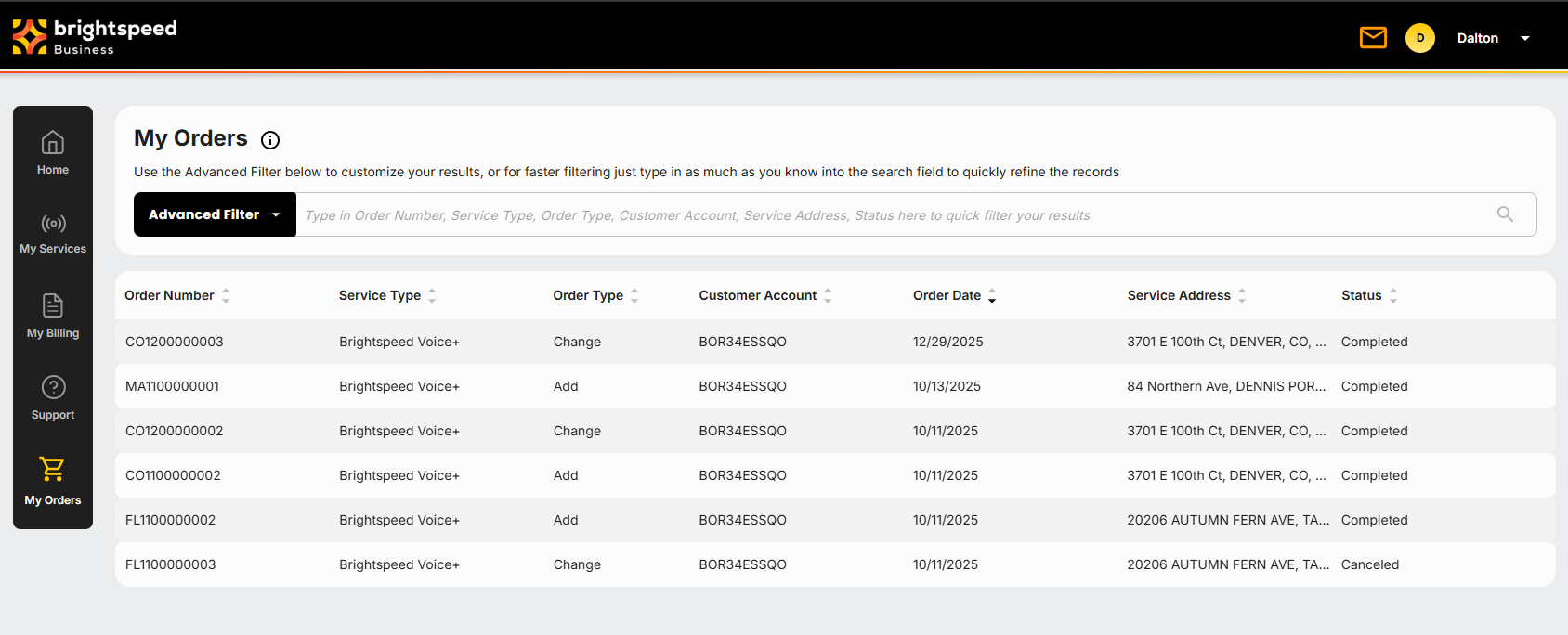
Your Order Status order can be one of the following:
- Submitted
- Accepted
- Confirmed
- Dispatch
- Completed
- Canceled
You can also view the Order Status when you click on an order to see more details.
Your Order Status order can be one of the following:
- Submitted
- Accepted
- Confirmed
- Dispatch
- Completed
- Canceled
You can also view the Order Status when you click on an order to see more details.
Your Order Status order can be one of the following:
- Submitted
- Accepted
- Confirmed
- Dispatch
- Completed
- Canceled
You can also view the Order Status when you click on an order to see more details.
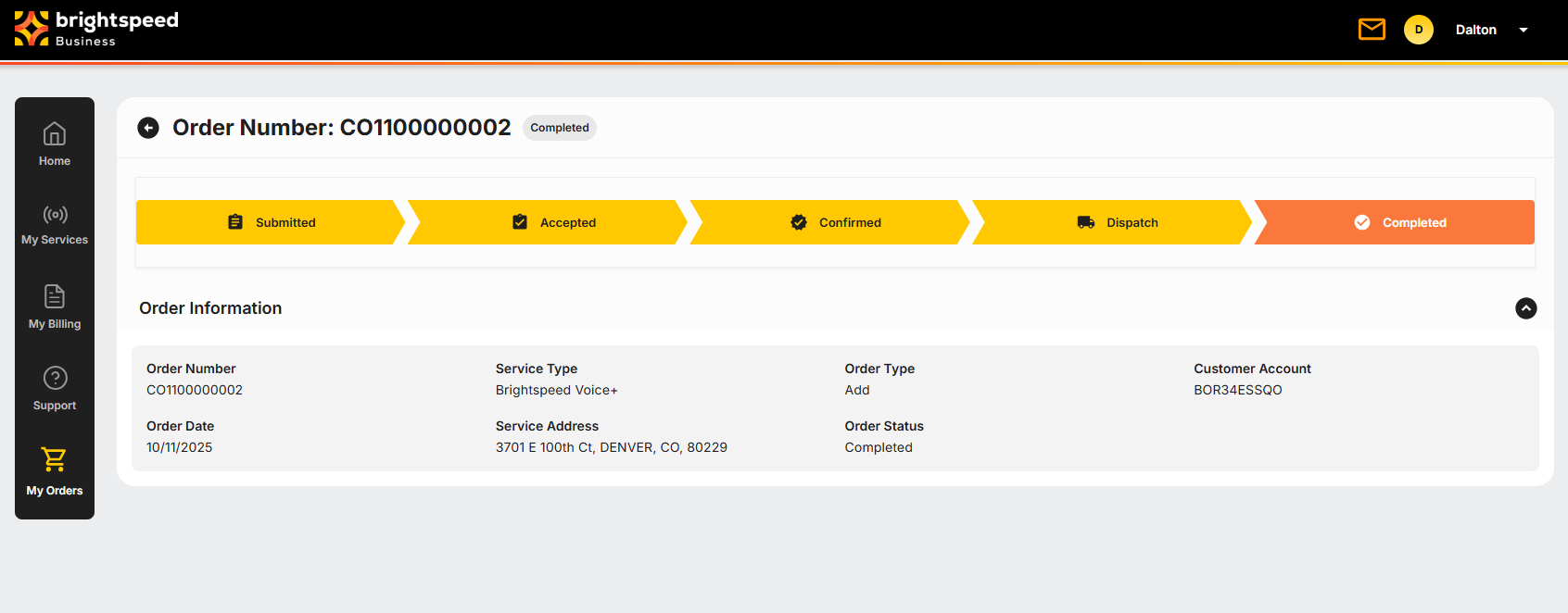
Under the Order Number, there is a completion bar that indicates your order status, with the current status highlighted in orange.
Under the Order Number, there is a completion bar that indicates your order status, with the current status highlighted in orange.
Under the Order Number, there is a completion bar that indicates your order status, with the current status highlighted in orange.