


How much internet speed does my family actually need?
Research from Consumer Affairs found that the average household owns 21 web-enabled devices—a category that includes everything from smartphones to game consoles to smart appliances. Even if all of those devices aren’t online at once, something as simple as one person making a video call while someone else streams in 4K can disrupt both people’s internet use.
More speed isn't always the answer, however. What your family actually needs depends on how you use the internet, how many people are online at once, and what activities you're doing. This guide will walk you through the key factors that determine the right internet plan for your household, so you can make an informed decision without overpaying for speed you don't need.
How internet speed actually works
Before you can figure out which internet is right for your family, it helps to understand what those numbers actually mean. You’ll notice that the speeds of most internet plans are measured in Mbps.
Mbps stands for megabits per second—it's the measure of how much data your internet connection can handle at once, also called its bandwidth. When you see a plan advertised as "100 Mbps" or "500 Mbps," that number tells you (approximately) how much your connection is capable of transmitting, typically over a wired connection.
If bandwidth measures the data speed available from your connection, speed (in this context) is the data speed available to any individual device. It's split into download and upload speeds:
- Download speed: How quickly you can pull data from the internet (streaming shows, loading websites, downloading files)
- Upload speed: How quickly you can send data out (video calls, uploading files, online gaming)
Most activities rely heavily on download speed, which is why that's the number internet providers typically advertise. However, upload speed is important for applications like video calls and content streaming, so it's increasingly a must-have for everyday household internet.
How many Mbps does your home need?
The real answer always depends on your specific situation, but here are some baseline recommendations to get you started.
Recommended speeds by household size
Household size is the first major factor to look at when you’re evaluating what kind of internet connection you need.
- 1–2 people: 100–200 Mbps is typically enough for a couple or roommates who aren't all online at peak times. This handles streaming, browsing, and video calls without much issue.
- 3–4 people: 200–400 Mbps gives you breathing room when multiple family members are online. This range works well for families with school-age kids who are streaming, doing homework, and gaming. If multiple people work from home on the same days, this can be a safe range for ensuring everyone has plenty of speed for work calls and remote collaboration.
- 5+ people: 400–1000 Mbps (1 Gbps) becomes necessary when you have a full house with teenagers, young adults, remote workers, and/or multiple devices running simultaneously.
Recommended speeds by activity
The other half of the equation is how much bandwidth your online activities use. The official speed recommendations from the FCC will give you a good idea of what you might need:
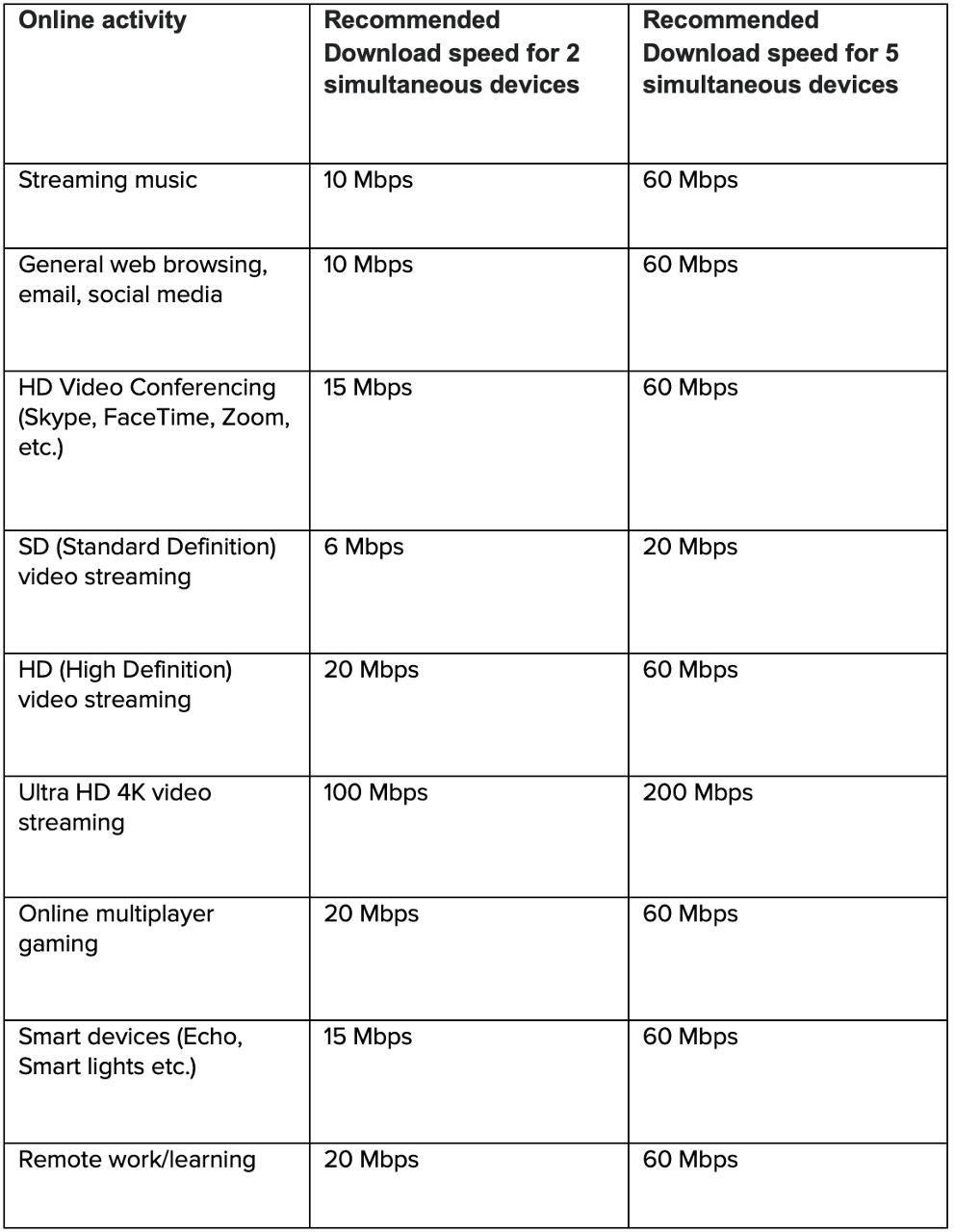
Adding it all up
Based on the numbers we’ve provided here, you can estimate your household’s internet needs using this formula:
- List out what activities happen in your home during peak hours (usually evenings and weekends)
- Note how many people are doing each activity simultaneously
- Add up the Mbps requirements for those activities
- Add 25–30% as a buffer for overhead and future growth
Example: “How many Mbps do I need for five people?”
A family of five during evening hours might have:
- Two people streaming HD video (20 Mbps × 2 = 40 Mbps)
- Two people gaming (40 Mbps)
- One person on a video call (10 Mbps)
- Smart home devices running (5 Mbps)
- Total: 95 Mbps minimum needed
- With 30% buffer: 130 Mbps
- Recommended plan: 200-300 Mbps or higher for comfortable headroom
Even if this is more internet bandwidth than your family members regularly use, the point is to determine how heavy your usage can get, then adjust based on that. You also might decide that it’s OK if some people have to stop gaming while others are at work or school. Ultimately, it’s all about making the right choice for your home.
Signs you’ve outgrown your current internet plan
How do you know when it’s time to switch? Look out for these indicators:
- Frequent buffering or lag during peak hours: If your video quality drops or games lag every evening when multiple family members are online, there’s a real possibility that bandwidth is maxed out.
- Video calls dropping or pixelating regularly: When work calls freeze or your face becomes a pixelated mess, it's often a sign your upload speed can't handle the demand—especially if others are streaming simultaneously.
- Multiple family members competing for bandwidth: If someone yelling "Don't start gaming, I’m about to get on a call!" is a regular occurrence in your house, you probably need more bandwidth.
- Constant complaints about slow internet: When "the internet is slow" becomes a daily refrain, it's worth considering whether your plan matches your actual usage.
If you think your internet isn’t meeting your needs anymore, try an internet speed test to determine what you’re working with, and compare the results with what you calculated in the previous steps.
Factors to consider when choosing an internet plan for your household
Thinking about upgrading, switching, or moving your internet service? Keep these things in mind while you’re shopping for a new plan:
Peak usage times
In most households, bandwidth needs change throughout the day. Evenings and weekends typically see the heaviest usage when everyone's home. If your household has multiple people working or learning from home, weekday mornings and afternoons become peak times too. Your internet plan needs to handle these peak loads, not just average usage.
Upload speeds
Download speed gets all the attention, but upload speed is critical for:
- Video conferencing (especially if you work from home)
- Online gaming (sending your actions to the game server)
- Uploading photos and videos to social media or cloud storage
- Livestreaming
Many internet plans have asymmetric speeds, with much faster downloads than uploads. If your household does a lot of video calls or gaming, pay attention to upload speeds when comparing plans. If fiber internet is available in your area, consider a fiber internet plan with symmetric upload and downloads.
Contract Terms & Data Caps
Read the fine print of an internet service provider's contract before signing up. Be aware of any terms included in the contract that can affect your internet service experience, including:
- Contract length: Are you locked in for a year or two? Many companies charge an early termination fee if you cancel service before your contract is over.
- Promotional pricing: What's the price after the first 12 months? Promotional "teaser" rates can leave you with a plan that suddenly becomes much more expensive.
- Data caps: Some plans limit how much data you can use each month. Streaming and gaming households can blow through caps quickly, resulting in overage fees or throttled speeds.
- Equipment fees: Are there monthly charges for the modem or router? Renting your equipment from your provider is often a good option, but be sure to check whether it increases your plan's costs.
Choosing an internet plan for your family
So, what type of plan should you actually get?
Standard broadband (typically DSL or cable internet with speeds up to 100–200 Mbps) works fine for smaller households with moderate internet use. If you're a couple who streams occasionally and works from home a few days a week, standard broadband speeds may be fine for your needs.
When to upgrade to fiber: Fiber internet makes sense for larger households, gamers, heavy internet users, or anyone who needs consistent upload and download speeds. Fiber delivers:
- Symmetrical speeds (same upload and download)
- More reliable connection with less slowdown during peak times
- Better performance when multiple devices are active
- Future-proof bandwidth as your household's needs grow
For families with teenagers, remote workers, or anyone who games or streams regularly, fiber eliminates the bandwidth battles and gives everyone the connection they need. If fiber is available in your area, it’s a great investment in your home’s digital infrastructure.
Aligning your plan with your needs
Finding the right internet plan is all about matching your household's actual needs. Take stock of how many people are in your home, what you're all doing online, and when you're doing it. An honest assessment will point you toward the plan that delivers what you need without paying for what you don't.
Ready to find the right fit? Explore Brightspeed internet plans designed for how families actually use the internet.
