.png)


How to return your Brightspeed - Provided Equipment
Returning your Brightspeed-provided equipment is quick and easy. Follow the steps below to start your return.
Residential Customers:
You'll complete a short form to receive either a UPS shipping label or a QR code for your return. Select the option that works best for you.
Enterprise, Mid Markets & Small Business Customers:
Do I Need to Return My Equipment?
If you've canceled your Brightspeed service and were using equipment provided by Brightspeed, you'll need to return it within 30 days of your service disconnection to avoid being charged for the equipment.
We recommend returning your equipment as soon as possible.
How the Return Process Works
- Click Start Your Equipment Return.
- Select “Continue as Guest”.
- Enter your name and address.
- Choose either a UPS shipping label or a QR code (see return option details below).
- Pack your equipment.
- Drop it off at UPS and keep your receipt.
Choose Your Return Option
Option 1: UPS Shipping Label
- Choose the “Print and email label (print now or print from email later)” option after completing the return form.
- We'll email you a printable PDF shipping label.
- Print it at home or have a UPS Store print it for you.
Option 2: QR Code (No Printer Needed)
- Choose the “Request QR Code to be used at The UPS Store” option after completing the return form.
- We'll provide a QR code that you can display on your phone.
- Take your packed equipment and the QR code to a participating UPS Store.
- The UPS Store will scan the QR code right from your phone.
- You do not need a shipping label if you are using the QR code.
- Keep your receipt.
If you’re unable to visit a UPS Store to drop off your equipment, UPS may offer pickup services in your area. Pickup service must be scheduled directly through UPS, and any pickup fees are the customer’s responsibility.
What equipment should I return?
Return:
- DSL modem/router (C3000, C4000)
- Fiber router (u6, 7u10t, C4000)
- Mesh extenders (u4m, u4hm, 7u6m)
- Power cords
- Power supplies
- Ethernet cables included with your equipment
Do NOT Return:
- Equipment labeled 'PROPERTY OF BRIGHTSPEED. DO NOT REMOVE FROM PREMISES’.
- Fiber ONT devices (1100, 1101) like the ones below; you will NOT be charged for these devices.
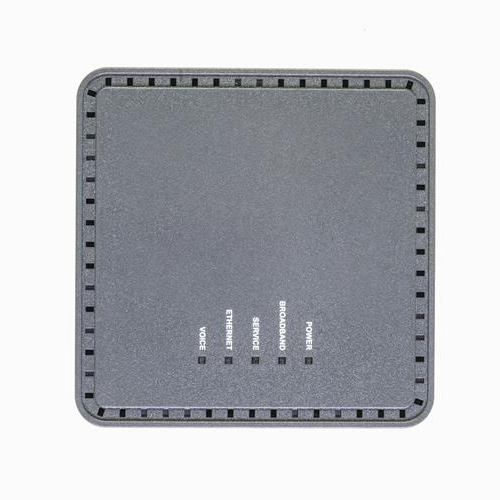
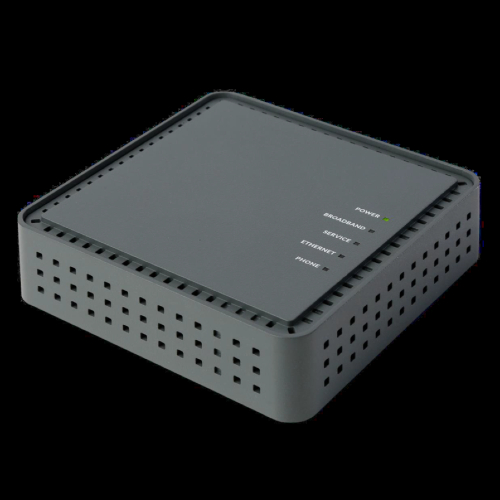
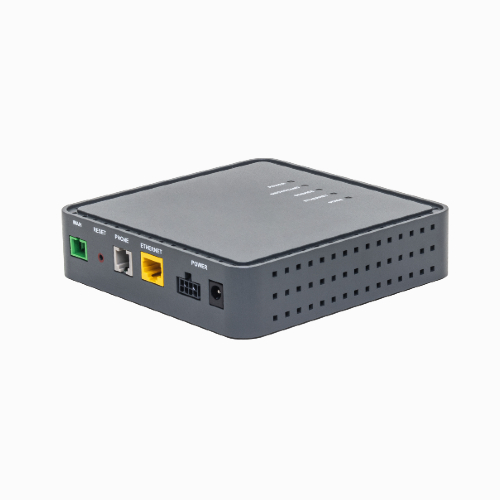
Packing & Shipping Instructions
- Gather all Brightspeed-provided equipment and accessories, except for Fiber ONT devices and any equipment labeled 'PROPERTY OF BRIGHTSPEED. DO NOT REMOVE FROM PREMISES’.
- Pack everything securely in a sturdy box.
- Remove or cover any old shipping labels.
- Attach your UPS shipping label (skip this step if using the QR code or until UPS prints the label for you).
- Drop off your package at a UPS Shipping Center or participating UPS Store.
- Keep your UPS receipt until your return is complete.
Important: Always use the UPS shipping label or QR code provided by Brightspeed. Returns sent without the provided label cannot be tracked and may result in non-return equipment charges.
Return Your Brightspeed Business Equipment
If you’re an Enterprise, Mid-Market, or Small Business customer using Brightspeed Voice+ or RingCentral equipment, follow the steps below.
Who should use this page?
- This page is for Business customers returning Voice+ or RingCentral equipment.
- If you’re a Residential customer, see the Residential Customer section above.
How to start your return
Contact your sales representative.
Important notes:
- Your account team can provide instructions
- Have your account information ready
Special instructions
All Brightspeed-Provided Equipment must be returned within 30 days from the date your services are terminated to avoid additional charges.
If you recently subscribed to Brightspeed Internet service and chose to use your own router, please store your Brightspeed-provided router in a safe and easy-to-remember location. If you experience service issues in the future, you may be asked to reconnect the Brightspeed router to help diagnose the problem.
Replacement of Brightspeed-Provided Equipment
Returning faulty or defective equipment
If you believe your equipment is faulty and needs to be replaced, contact technical support first to confirm that your equipment needs to be replaced. Our team will help you determine if your equipment can be repaired. If approved, we’ll send a replacement and will need to return the defective device after receiving the new one.
Need help?
If you have questions about your return, billing, or equipment status, contact Brightspeed support.
Equipment recycling program
Did you know that less than 20% of discarded electronics were recycled worldwide in 2019? We are doing our part to keep e-waste out of landfills, but we can't do it without you! Please follow the return instructions above to get a prepaid shipping label and ship your old Brightspeed-Provided Equipment* back to us, and we will refurbish or recycle. Thank you for your partnership with this important initiative.
*Note: Please check for Equipment labeled “PROPERTY OF BRIGHTSPEED. DO NOT REMOVE FROM PREMISES.” Do not return this equipment to Brightspeed.
Need Help?
Top modem/router topics
- Set up your modem and activate internet
- Connect devices to your WiFi network
- Should you use 2.4 or 5 GHz WiFi?
- Brightspeed compatible modems
- How to read your modem lights
- When and how to use modem reset
- How to return a modem
- How to upgrade your modem's firmware
- Modem or router: What's the difference?
View all Modem/Router topics
Top tools
Log in to access our most popular tools.


Brightspeed services support


